Wireframes, Testing & Mockups
October 2025
Wireframes & Iteration
Low-fidelity wireframes were created to explore layout, information hierarchy, and key interaction patterns before moving into high-fidelity design. At this stage, the focus was on validating core flows and interaction clarity rather than visual polish. Select screens were iterated based on usability feedback, while others remained unchanged after initial validation.


Product Description Page (iterated)
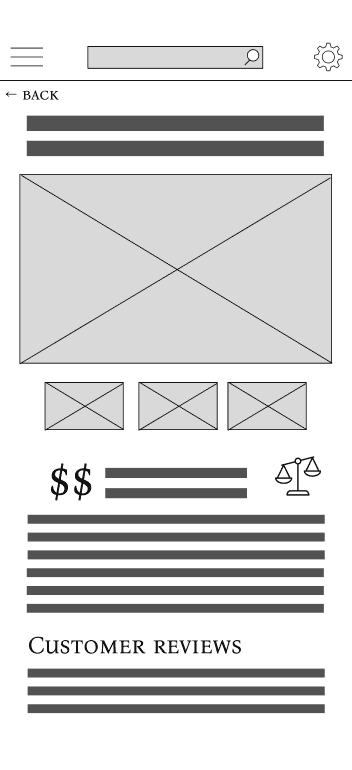
The product detail page was designed to balance high-level product information with access to deeper specifications and reviews. In the initial wireframes, the comparison action was represented using a scale icon to suggest evaluating products.
During usability testing, users did not immediately recognize the icon as a comparison action and hesitated when asked to compare products. Based on this feedback, the interaction was revised to include a clearly labelled “Compare” button, improving discoverability and reducing ambiguity.

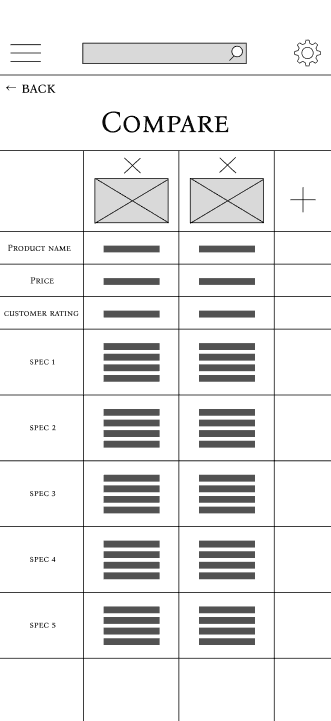
Comparison - Two Products (iterated)
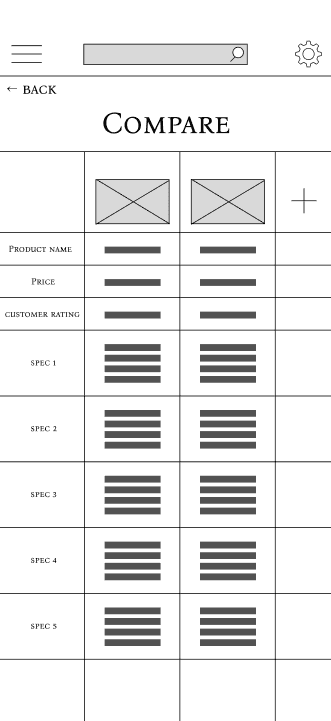
The two-product comparison screen was designed to allow users to evaluate key attributes side by side. In early wireframes, the comparison assumed a fixed set of products once added. During usability testing, users attempted to adjust their comparison but were unsure how to remove a product without restarting the flow.
To support more realistic, iterative decision-making, a clear removal control (“X”) was added above each product. This change allowed users to refine comparisons fluidly and aligned better with real-world evaluation behavior.
Usability Testing
The following usability testing insights informed the wireframe iterations described in the previous section.
Testing Goals
The goal of usability testing was to validate the clarity and discoverability of key interactions within the low-fidelity prototype, with a particular focus on product evaluation and comparison flows. Testing aimed to identify points of hesitation or confusion rather than assess visual design or performance metrics.
Method & Setup
Lightweight usability testing was conducted using a low-fidelity Figma prototype. Participants were asked to complete a small set of task-based scenarios while thinking aloud. Sessions were informal and exploratory, with observations recorded qualitatively to identify interaction issues and opportunities for improvement.
Sample Tasks Tested
Participants were asked to complete the following tasks:
Browse gaming accessories and select a product
View product details and attempt to compare it with another product
Adjust the comparison by removing or replacing a product
Key Findings
Finding 1: Compare Action Was Not Immediately Discoverable
When viewing the product detail page, participants hesitated when asked to compare products and did not immediately associate the scale icon with a comparison action.
Finding 2: Users Expected to Modify Comparisons Easily
On the comparison screen, participants attempted to adjust the selected products but were unsure how to remove an item without restarting the flow.
Design Changes Informed by Testing
Insights from usability testing directly informed wireframe iterations.
Comparison action was updated from an icon-only representation to a clearly labelled “Compare” button to improve discoverability.
Removal controls were added to the comparison screen (the “X”) to support iterative decision-making without disrupting the flow.
These findings informed the next iteration of the wireframes and the development of high-fidelity mockups and prototypes.
High-Fidelity Mockups
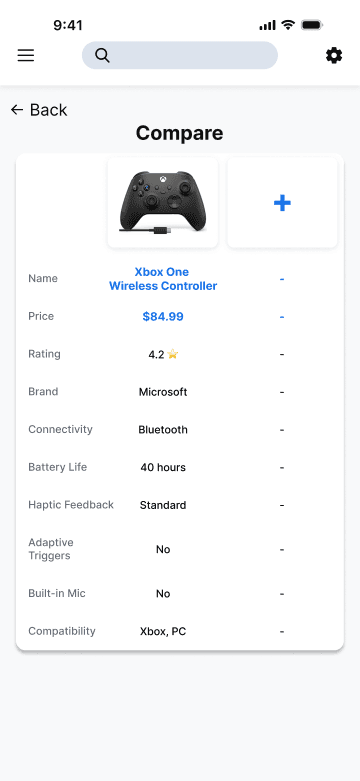
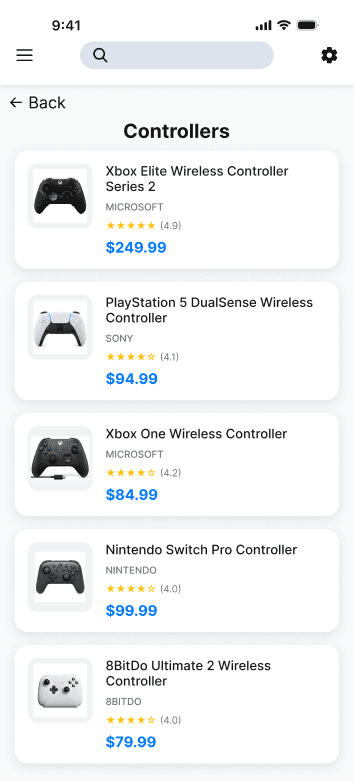
High-fidelity mockups were created to refine clarity, strengthen visual hierarchy, and add small interaction improvements that support navigation and decision-making. Visual decisions focused on readability, consistency, and reducing cognitive load rather than branding or stylistic exploration. The overall structure remained consistent with the wireframes, with changes focused on improving affordances, exit points, and content completeness.
Improving Discoverability & Navigation Entry Points
In the high-fidelity designs, clearer navigation cues were added to support exploration without increasing cognitive load.
For example, a “View All” action was added to the Popular section to give users a clear path to deeper browsing while preserving the lightweight nature of the home screen.


Making Comparisons Easier to Scan & Understand
In the comparison view, visual hierarchy was refined through spacing, alignment, and typographic emphasis to make attribute differences easier to scan. These changes made differences between products easier to scan and compare at a glance, without changing the underlying interaction structure.